If you are an Apple user, iMessage is a crucial tool for staying in touch with your friends, family, and colleagues. It’s reliable, fast, and free, but what happens when it stops working? It can be incredibly frustrating, especially if you rely on it for work or personal use. In this article, we’ll go over some common reasons why iMessage might not be working on your Apple device, and we’ll provide easy fixes that anyone can do.
Why iMessage may not be working on your Apple device?
Network issues
iMessage requires a stable and strong internet connection to function properly. If your device is not connected to the internet, or if your internet connection is weak, iMessage may not work correctly.
Apple servers are down
iMessage uses Apple's servers to send and receive messages. If those servers are down or experiencing issues, iMessage may not work properly.

Software issues
Like any software, iMessage can sometimes experience bugs or glitches that cause it to stop working correctly. This can happen after an update, or for no apparent reason at all.
Easy Fixes for iMessage Not Working
Check your internet connection
One of the most common reasons why iMessage might not be working is a weak or non-existent internet connection. Check your Wi-Fi or cellular data connection and make sure it’s strong enough to support iMessage. If you are having trouble with Wi-Fi, try switching to cellular data, and vice versa.

Check Apple's System Status Page
If your internet connection is strong, the next step is to check Apple's System Status Page to see if there are any known issues with iMessage or other Apple services. If there is a problem, you can be sure that Apple is working to fix it, and you can check back later when the issue is resolved.
Restart your device
Restarting your Apple device can often solve iMessage problems. This will close all apps and processes and allow your device to start fresh. Simply press and hold the power button on your device until you see the slider to power off. Slide the power off, wait a few seconds, then turn your device back on.Check your date and time settings
If your device's date and time settings are incorrect, it can cause problems with iMessage. Make sure your device is set to the correct date and time, and that the time zone is correct as well. You can find these settings in the Date & Time section of your device's Settings app.Update your device
Updating your device to the latest version of iOS can often fix iMessage problems. Go to the Settings app on your device, tap General, then tap Software Update. If an update is available, follow the on-screen instructions to install it.
Sign out and sign back into iMessage
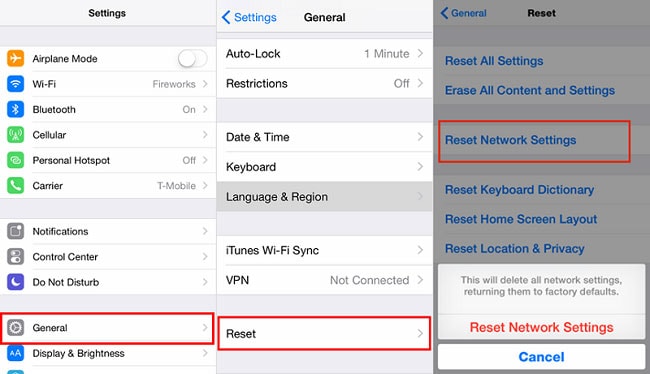
Reset your network settings

Tips for Avoiding iMessage Problems in the Future
Now that you have fixed your iMessage problems, here are some tips to help you avoid them in the future:
Keep your device updated
Use a strong internet connection
iMessage requires a stable and strong internet connection to function correctly. Make sure you have a good Wi-Fi or cellular data connection before using iMessage.Keep your date and time settings accurate
Make sure your device's date and time settings are correct to avoid any issues with iMessage. If your device's clock is set to the wrong time, it may not be able to connect to the iMessage servers.

Conclusion
iMessage is an essential tool for many Apple users, and it can be frustrating when it stops working. However, with these easy fixes, you should be able to get it up and running again quickly. Remember to keep your device updated, use a strong internet connection, and keep your date and time settings accurate to avoid future iMessage problems.
FAQs
If your iMessage is still not working even though you have a strong internet connection, try restarting your device or resetting your network settings.
Q2. Can I use iMessage on non-Apple devices?
No, iMessage is an Apple-only messaging service.
Q3. Will resetting my network settings erase my Wi-Fi passwords?
Yes, resetting your network settings will erase all Wi-Fi passwords stored on your device.
Q4. How often should I update my device?
Apple regularly releases updates to iOS, so you should check for updates at least once a month.
Q5. Why does iMessage need a strong internet connection?
iMessage requires a strong internet connection to send and receive messages quickly and reliably. If your connection is weak, messages may not be delivered or may take a long time to send.